AutoTranslationCAD
Automatic translation of texts in CAD.


AutoTranslationCAD - add-on for AutoCAD, NanoCAD, BricsCAD, ZWCAD, GstarCAD

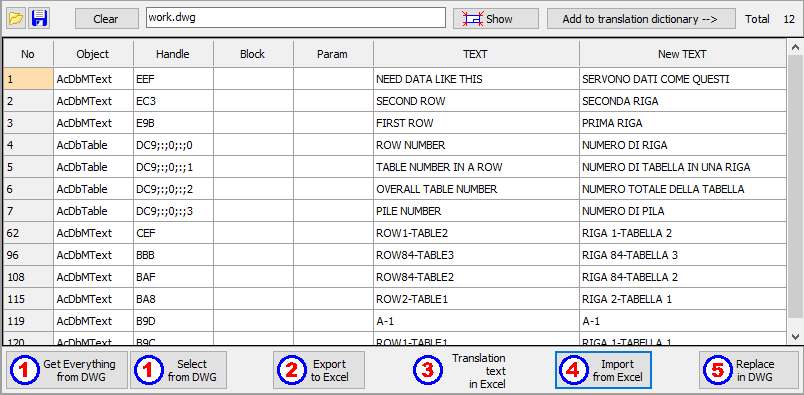
In just 5 steps you can completely translate all texts in CAD drawings

Simple and convenient method of work:

• A table of all texts from the drawing is automatically created for further translation;
• The table of all texts is exported to an Excel file;
• You independently, as it is convenient for you, translate into another language;
• Import the Excel file with the translation back into the table;
• Old texts in the drawing are automatically replaced with new ones received from the Excel file.

Automatic translation by the connected dictionary is also possible:
• You create your own dictionary of previously translated texts, add texts as needed;
• You can apply the translation from the dictionary immediately after receiving texts from the drawings.

The program has many settings that allow you to:
• Select texts by type of objects;
• Select different text encodings;
• Create multiple dictionaries for different languages;
• Exclude necessary texts from processing.

Attention !!! In AutoCAD LT - the program does not work !!!

Current version: 1.3 Release date: 21.03.2026 Trial period - 7 days.

Updating and upgrading to a new version is free!

Download AutoTranslationCAD


Instructions for activating and deactivating keys


Payment methods:

Payment by bank cards, PayPal, Stripe

For individuals and organizations:
One license (key) is valid for one computer user only. Multiple users (computers) require multiple licenses.

Sales are carried out in the partner store LavaTop

License for 1 year. Pricing - 14 € Euro.


By clicking the payment button, you agree with the Terms of Service and Privacy Policy


A letter with the program activation key will be sent to the e-mail you specified within 1-2 working days after confirmation of payment.
Unfortunately, we do not issue checks. If you need confirmation of payment, you can use a check from your online bank, which will confirm payment.
To speed up the key delivery, we recommend sending a message about the purchase on Telegram or WhatsApp.


System requirements:
Microsoft® Windows® 7 - 11
.NET Framework 4.6 or later
Attention !!! In AutoCAD LT - the program does not work !!!


Instructions for activating and deactivating keys

PATENT RU2025686436


KDMsoft ©
Copyright © Dmitrii Kirillov. All rights reserved.
Write on Max Write on Telegram