
|
 MultiElement MultiElement
|
|
Creation and maintenance of a database of parts and assembly elements in CAD.
|
MultiElement - is an add-on for AutoCAD, NanoCAD, BricsCAD, ZWCAD, GstarCAD, AutoCAD LT, and KOMPAS.
When creating drawings, users almost always use previously created elements by copying them from other drawings. This increases the speed of work and reduces errors.
However, this method always has one limitation: it's impossible to remember exactly when and where we created the element we're looking for.
And the main problem is finding these elements.
This program is specially designed for creating, saving and using each user's own drawing elements at their own discretion.
The main advantage of the program is the quick creation of your own elements; you only need to select the desired elements and they will be added to the database.
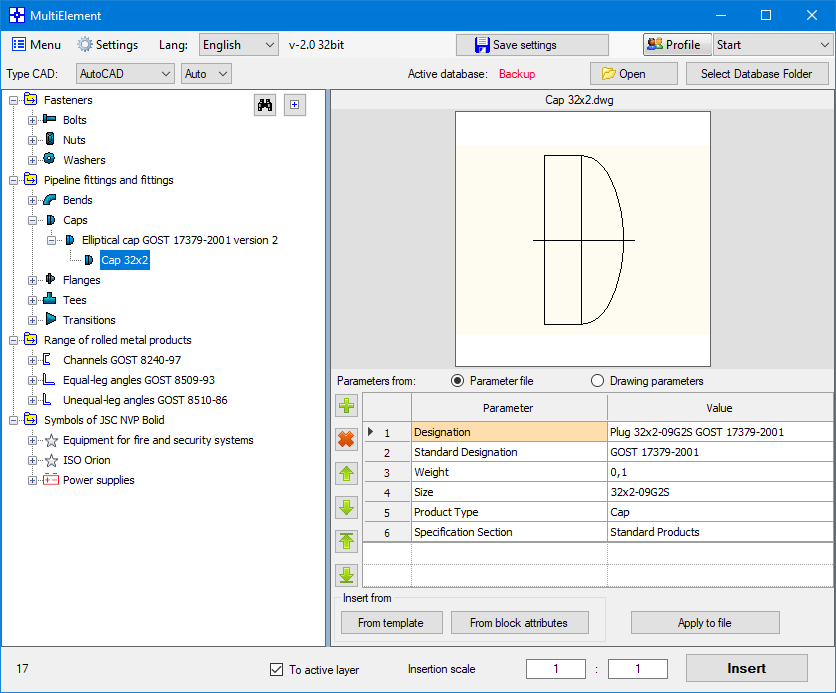
The element database is displayed in the form of a tree, which allows you to find the required element in a very short time.
After selecting the required element, it is inserted into the working drawing with one click on the tree or by clicking the insert button.
•Elements can consist of any set of primitives (segments, arcs, blocks, etc.).
•The user can, at his own discretion, create the necessary folders for storing elements in the database.
•Element files and the element database are stored in their original open form and can be moved to any location on the user's drives or to the organization's server.
•Each element displays its mini-image (preview).
•It is possible to add a description or characteristics to each element, which will allow you to more accurately determine its purpose before inserting it into the drawing.
•Each folder or element in the database tree can be assigned its own graphic representation (icon), which will increase the search speed due to visual perception.
•The element selection window can be quickly launched by placing a program shortcut in the tray or by creating buttons on the CAD program panels.
•The program has many settings that can be changed to suit the needs of each individual user.
|
|
MultiElement – a program for increasing labor productivity when creating drawings in CAD programs.
This program allows you to quickly create your own database of elements, fragments, and 3D bodies.
The program allows you to create your own set of elements and quickly find previously used elements, insert them into the working drawing, and also create a description and characteristics for each element.
Using MultiElement you can:
• Quickly create individual elements in an open drawing or from a specified block;
• Вставить ранее созданный элемент в рабочий чертеж в минимальное время;
• Catalog the elements as you wish (organize them into folders);
• Add a description and characteristics to each element at your discretion;
• Use one element base for the entire enterprise;
The program will be useful:
• To create design and working documentation;
• For development of 3D models of any structures;
• To ensure consistency in drawings across all employees.
|
| •Current version: 2.1 |
| •Release date: 30.07.2026 |
| •Trial period - 7 days. |
Updating and upgrading to a new version is free!
Administrator rights are NOT required. Install as a user as usual!
Instructions for activating and deactivating keys
Payment methods:
Payment by bank cards, PayPal, Stripe
For individuals and organizations:
One license (key) is valid for one computer user only. Multiple users (computers) require multiple licenses.
Sales are carried out in the partner store LavaTop
| License for 1 year. |
Pricing - 14 € Euro. |
 |
By clicking the payment button, you agree with the Terms of Service and Privacy Policy
A letter with the program activation key will be sent to the e-mail you specified within 1-2 working days after confirmation of payment.
Unfortunately, we do not issue checks. If you need confirmation of payment, you can use a check from your online bank, which will confirm payment.
To speed up the key delivery, we recommend sending a message about the purchase on Telegram or WhatsApp.
System requirements:
Microsoft® Windows® 7 - 11
.NET Framework 4.8 or later
Attention !!! In AutoCAD LT - the program does not work !!!
Instructions for activating and deactivating keys
|


